Session 5 • September 11, 2026
Session 5 was different from the start. We came in with one goal: stop talking about research notes and actually build one, live, from the ground up. No polished finished product to admire — just the real process, in real time, with real records. William was the only one who made it that night, which meant we essentially ran a one-on-one clinic, and that turned out to be a gift. We went deep on Ralph Sutton Naylor, my great-grandfather, and by the time we wrapped up, we had walked through the full arc of a research session — from blank document to filled-in timeline, with census records, newspaper clippings, birth certificates, obituaries, and a family photo along the way.
Quick Check-In: Whatever You Got Done Is Enough
We opened with a brief check-in on the previous session’s homework. William hadn’t had a chance to work on his tree — it had been a hectic week. That’s fine, and worth saying plainly: genealogy doesn’t run on a fixed schedule. The work accumulates over time, not in any particular week. We moved on.
One scheduling note did come up: some of the sisters who wanted to join the class can’t attend on Thursday nights because of Relief Society Presidency meetings. William is going to follow up with them to see whether a different night might work better. If you’ve been meaning to join and Thursdays don’t work for you, reach out — we may be adjusting the schedule.
The Architecture of a Research Notes Document
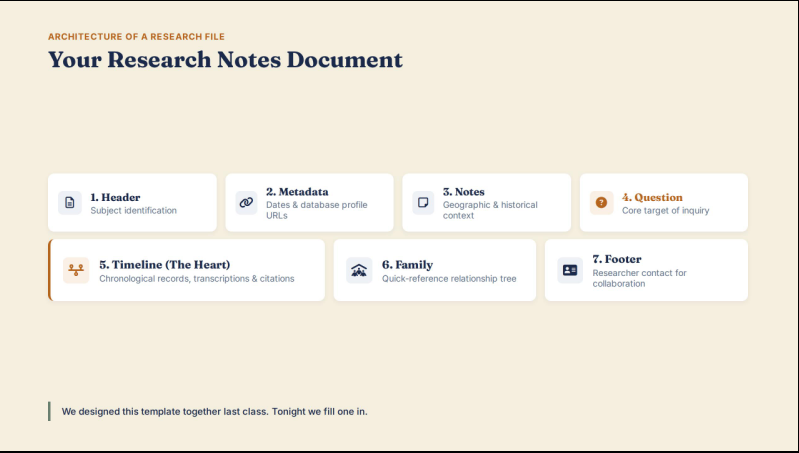
Before touching a single record, I walked through the template I’d sent out with the session email. This is the same template we designed together last session. The goal was to make sure everyone understood why each section exists before we started filling one in.
The document has seven sections, and each one has a specific job:
Section 1 — Header. The subject’s name, formatted last-name-first for consistent digital filing. “Naylor, Ralph Sutton” is immediately findable whether you’re in a folder, a search result, or a drive. Don’t use first-name-first — you’ll thank yourself later when you have thirty documents and need to sort them.
Section 2 — Metadata Registry. Creation date, last-updated date, and live links to the subject’s profiles on FamilySearch and Ancestry. The point of this section is to let you jump straight from your notes to the live record without re-searching. You paste in the profile URL or just the individual’s ID — either works. I showed how to grab it directly from the browser bar and hyperlink it in the document.
Section 3 — Context Notes. A freeform field for geographic and historical context that shapes your research. County boundaries changed. Arizona was a territory, then a state. The 1890 census was destroyed by fire. These are facts you’ll forget in six months if you don’t write them down where the research lives.
Section 4 — Research Question. The single thing you’re trying to answer right now. For Ralph, I used a broad framing: What were Ralph’s occupations and residences between 1910 and 1950? A research question keeps you from chasing every rabbit hole that shows up in the hints. When you get lost, come back to it.
Section 5 — The Timeline. This is where the actual work happens. Everything else is scaffolding for this section.
Section 6 — Family Summary. A quick-reference list of parents, spouse, and children with birth dates and locations. No citations here — those stay in the timeline. This section also functions as a built-in checklist: every child listed is a birth certificate you still need to find.
Section 7 — Document Footer. Your name, relationship to the subject, contact information, and the year you started the research. If you ever upload this document to FamilySearch Memories or the Ancestry gallery, other researchers can reach out to you. It turns a static document into a collaboration tool.
Starting the Timeline: The Census Scaffold
Once the header and metadata were set up, we moved directly into Section 5. The first move is always the same: drop in the census decade years as placeholders before you find a single record.
(The research notes template is available as a free download at the bottom of this post.)
For Ralph, born in 1899, the starting point is the 1900 census — the first one taken after his birth. The scaffold looks like this: 1900, 1910, 1920, 1930, 1940, 1950. Those six placeholders represent the full span of available federal census records for his lifetime. The 1960 census won’t be released until 2035 — every country has its own privacy window, and the U.S. holds records for 72 years. Canada’s window is longer; England’s is different again. If you’re researching ancestors who died recently, you may find that the most recent census record you can access is the 1950.
With the scaffold in place, the gaps are visible before you’ve done any work. That’s the point. Gaps aren’t failures — they’re your next research questions.
Working the 1910 Census: Reading the Whole Record
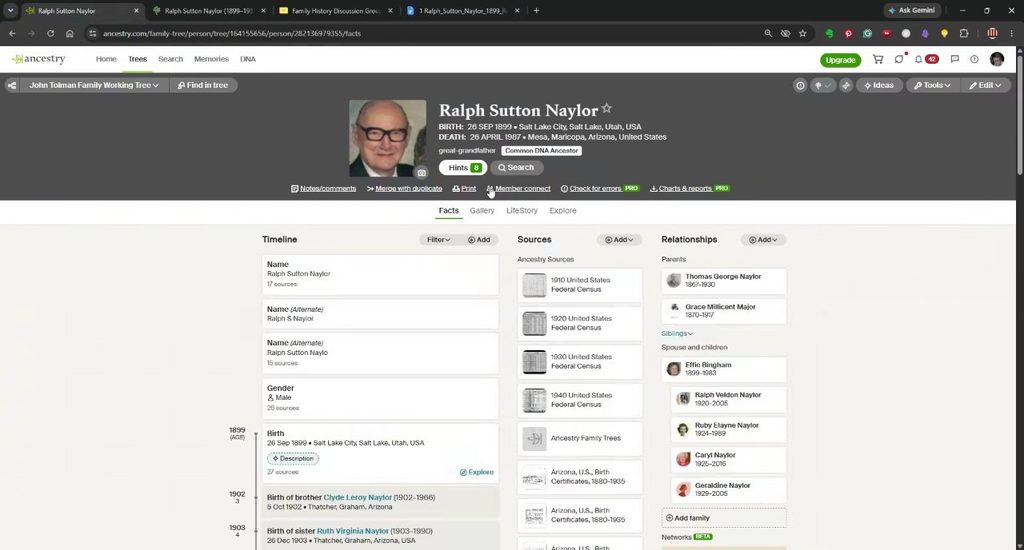
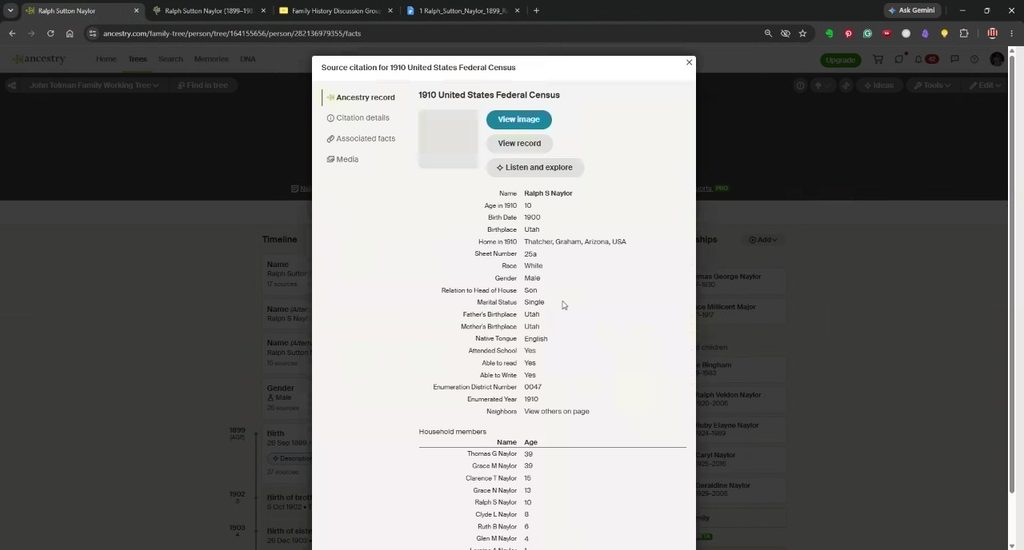
The first record we pulled was the 1910 US Federal Census for Thomas G. Naylor — Ralph’s father — in Thatcher, Graham County, Arizona.
A few things I want to highlight about how to read a census record, because this is where most people stop too soon.
The record was enumerated on May 28th and 30th, 1910, by William G. Meyers, Supervisor District: Arizona, Enumeration District 47. That information matters. The enumerator’s name, the district number, and the dates are all clues — especially when you’re trying to locate records for other family members in the same area.
Thomas G. Naylor is listed as head of household, age 39, white male, married 17 years, born in Utah, occupation: barber, owns his own shop. His wife, Grace M. Naylor, is 39, and the record shows she had given birth to eight children — with seven living in 1910. That detail is easy to walk past, but it means there’s a child missing from our records. If you only count seven children in your tree, you’re incomplete. That eighth child who didn’t survive is someone worth researching.
Ralph Sutton Naylor appears on that record as a son, age 10, born in Utah, no occupation, speaks English.
When you’re transcribing into your timeline, use abbreviations to move fast. I use “B” for birth, “F” for father’s birthplace, “M” for mother’s birthplace. The full transcription can be cleaned up later. What you’re doing in the first pass is capturing the data before the window closes — you can formalize the citation afterward.
Citations: Fast First, Formal Later
One of the most common places people get stuck is citations. They feel like they need to write a perfect formal citation before they can move on, and so they either slow to a crawl or skip citing altogether.
Here’s the approach I use: paste the URL as a temporary footnote immediately when you find the record. Just highlight the address bar, copy it, insert a footnote in your document, and paste it. That gives you a link back to the record while you keep moving.
Then, when you’re done for the day — or when you’re ready to clean up the document — come back and formalize the citation. A proper source citation includes the source name, the event date, the specific location or page number, where you found it, and the date you accessed it. The “accessed on” date matters because URLs change. A citation that works today may not resolve in five years. If someone else is reading your notes and the link is broken, they need enough information to find the record without it.
I use footnotes rather than endnotes for a specific reason: when you insert a new record between 1910 and 1920 — a 1918 newspaper article you find two months from now — footnotes automatically renumber themselves. Endnotes don’t. Over a long document, that’s the difference between an organized research file and a citation disaster.
The 1950 Census: Ralph Running a Grocery Store in Globe
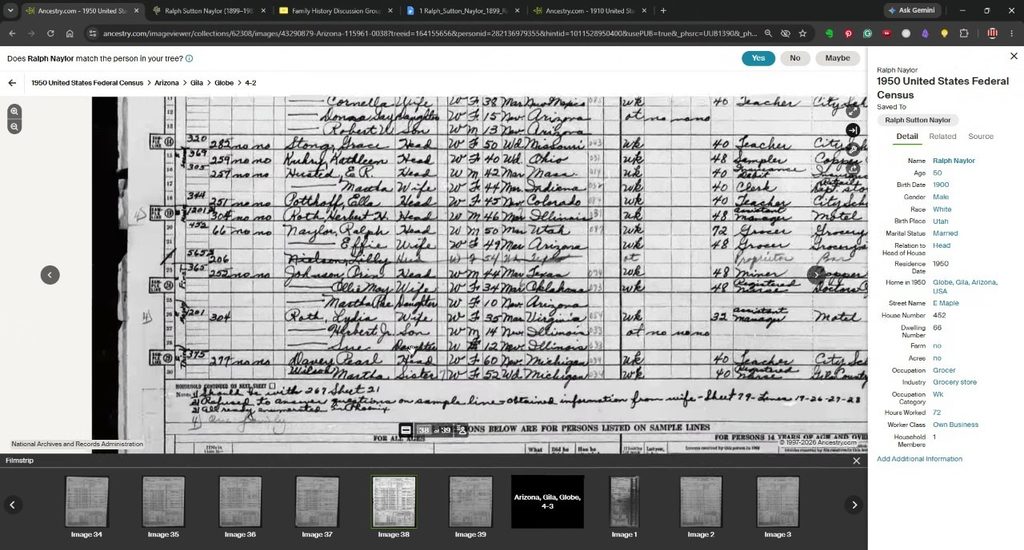
We jumped ahead to Ralph’s 1950 census record next, and it told a story I hadn’t fully assembled before. In 1950, Ralph Sutton Naylor was living at 452 East Maple Street in Globe, Gila County, Arizona, at age 50. He’s listed as a grocer — the owner of a grocery store. His wife Effie is listed as working in the store as well.
I accepted the record and saved it to his profile. The timeline entry went in for 1950: residence in Globe, Arizona; occupation: grocer.
This is also where we ran into one of the most common situations in Ancestry research: a record that partially matches but has worse information than what you already have. The 1950 census listed Ralph’s name as “Ralph Naylor” — no middle name — and gave only a birth year, not a full date. I already had a better birth date from the birth record we found previously. When Ancestry asks whether you want to swap in the information from the new record, look at it field by field. If your existing data is more complete, don’t overwrite it. Accept the residence, decline the birth year.
Newspaper Clippings: The Social Media of Their Time
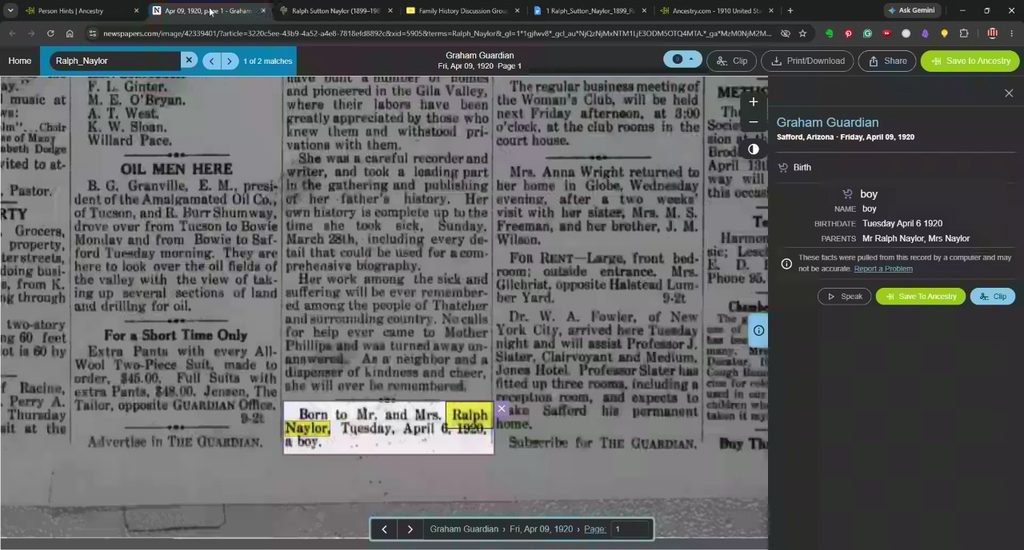
One of the hints that surfaced was a newspaper clipping from the Graham Guardian, Friday, April 9, 1920. The notice: “Born to Mr. and Mrs. Ralph Naylor, Tuesday, April 6th, 1920, a boy.”
That’s Ralph Veldon — Ralph and Effie’s first child, my grandfather.
Newspapers are worth the subscription. They were the social media of their time — announcements of births, marriages, moves, business openings, deaths, and the small details of daily life that don’t appear anywhere else. For Ralph alone, we found multiple clippings in a single session: the birth announcement, a reference to Ralph and a Rulan Moody leaving for Clifton to take new employment, a marriage announcement for his daughter Geraldine, and a basketball reference for a Ralph Naylor playing at BYU in 1941.
That last one is a good teaching moment. Before I added the basketball clipping to Ralph’s profile, I checked the 1940 census. Ralph Sutton Naylor was living in Graham County, Arizona, in 1940 — not Eureka, Utah. The basketball player was a completely different Ralph Naylor. Knowing where your ancestor was living at a given time is what lets you rule out records. Without that geographic anchor, it’s easy to build someone else’s life into your tree.
For downloading newspaper records: save both a PDF and a JPEG. The JPEG can be fed directly into an AI tool for interpretation if the handwriting or column layout is difficult to read. The PDF is your archival copy.
The Obituary That Fills in the Family
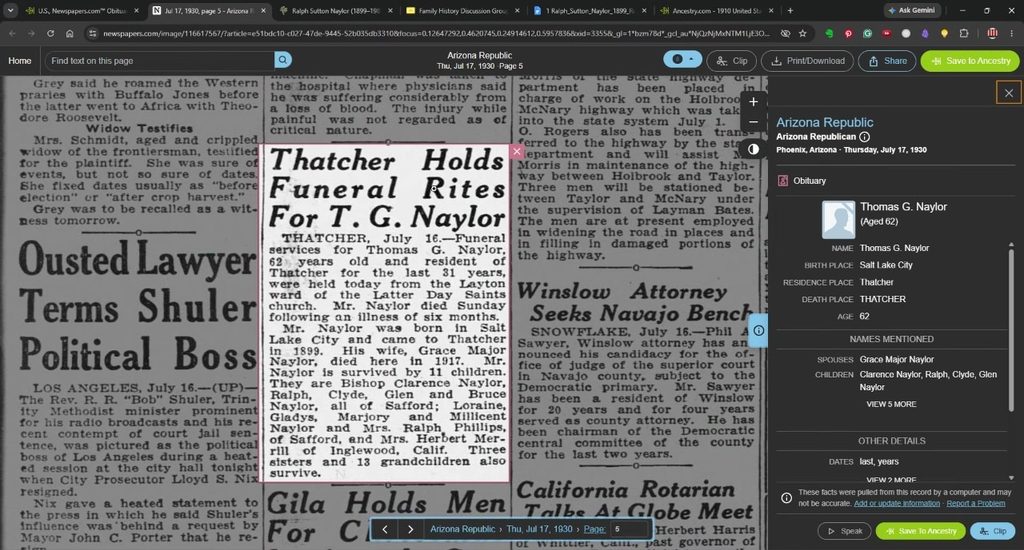
One of the most useful finds of the evening was the obituary for Thomas George Naylor — Ralph’s father — published in the Arizona Republic, Thursday, July 17, 1930.
The notice reads: Thomas George Naylor, 62-year-old resident of Thatcher for the last 31 years, died Sunday following an illness of six months. He was born in Salt Lake City and came to Thatcher in 1899. His wife, Grace Major Naylor, died in 1917. He is survived by 11 children.
From one obituary, we got: confirmation of his age and birthplace, his length of residence in Thatcher, his wife’s name and death year, and the number of surviving children. Those eleven children become eleven research threads, and Grace Major’s death in 1917 — when Ralph would have been 18 — is a biographical detail that shapes the whole family story.
This is why obituaries matter so much. A census record tells you where someone was on a specific day. An obituary tells you where they’d been.
Social Security Records and Private Trees
We also looked at the social security application for Geraldine Naylor — Ralph’s daughter — which showed her born July 16, 1929, and died March 30, 2005, in Safford, Arizona. Social security records became available after the Great Depression and are a reliable source for birth and death dates going into the mid-20th century. They also typically list the parents, which makes them useful for confirming family connections.
On the question of private trees and photos: during the session we encountered a relative — Brenda Kemp, a cousin — with 4,700 people in her Ancestry tree and a large collection of photos set to private. Some people keep their research locked down; others share everything. Mine is open, because I’m actively looking for cousins who have pieces of the puzzle I don’t. If you run into a private tree that has records or photos relevant to your research, it’s completely appropriate to send a message through Ancestry asking whether they’d be willing to share. Most researchers are happy to connect.
The Family Photo: Putting Faces to the Names
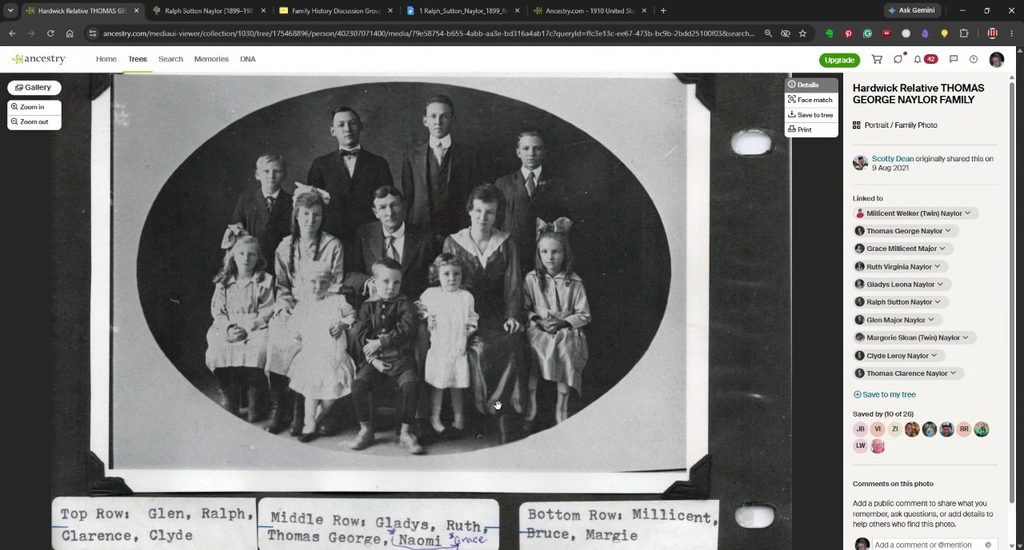
One of the better finds of the session was a family photograph linked to the Naylor tree, contributed by a researcher named Carol Borgay. The photo shows the Naylor family, with a caption identifying the individuals by row:
- Top row: Glenn, Ralph, Clarence, Clyde
- Middle row: Gladys (sometimes listed as Glattus), Ruth, George Thomas, Milson Grace, Naomi
- Bottom row: Millisent, Bruce, Margie
That’s Thomas George Naylor’s family — all in one image. I saved it to my Ancestry memories and linked it to the relevant profiles. Once a photo is linked in Ancestry, you can click through from the image to any named individual’s profile page. It turns a photograph into a navigation tool.
Building Backward: Following the Clues to England
Near the end of the session, William asked how to navigate from a profile back to the tree view. I showed him the home button in Ancestry — if you ever get lost in someone else’s profile, clicking the home button recenters the tree on you as the default person.
From there, we followed Thomas George Naylor back to his father — listed in Ancestry as Thomas Naylor, born in Budsworth, Cheshire, England. Ancestry suggested that George Naylor Sr. (born 1805) and Mary Septton may be Thomas’s parents, and pulled up an 1851 census record from Little Budworth, Cheshire, showing a George Naylor, Elizabeth, Thomas, and Catherine in the household.
I didn’t add them to the tree on the spot. That’s the discipline: Ancestry’s suggestions are leads, not conclusions. Before any record goes in, it gets reviewed. The 1851 England census and the Ancestry suggestion point in the same direction, but I need to verify that this Thomas — age 16 in 1851 in Cheshire — is the same Thomas who ended up in Salt Lake City and then Arizona. That verification is the next research question.
William mentioned that his own family surname is German, which points toward a different part of the pond. For German-line research, MyHeritage has strong record collections and is worth a separate look.
Where to Go This Week
- Open the research notes template that was sent with this session’s email and set it up for one ancestor — just the header, metadata, and a blank timeline scaffold with census years.
- Pull one census record for that ancestor, transcribe the key details into your timeline, and paste the URL as a temporary footnote.
- Check the family section: list the spouse and children you already know, and note which birth records you still need to find.
- Search for a newspaper clipping on Newspapers.com or Genealogy Bank — try the ancestor’s name and a known location. See what comes up.
- Write one formal source citation for the census record you transcribed, using the format: Source name • Event date • Location/page • Where found • Date accessed.
Next session we’ll keep building — more records, more research log practice, and we’ll start talking about how to use DNA matches to confirm the paper trail.
A Few Places to Start
- FamilySearch.org — Free global access to census images, vital index databases, and original record scans.
- Ancestry.com — Census records, military cards, directories, and newspapers; free access available through LDS family history centers.
- Salt Lake County Digital Archives — Indexed Utah birth records 1890–1911; useful for ancestors born in Salt Lake City during that window.
- Newspapers.com — Paid subscription; birth announcements, marriage notices, obituaries, and local news that fills gaps no census record can.
- MyHeritage — Strong record collections for European research, particularly German and Eastern European lines.
- matttolman.com/genealogy-family-history — Session recaps, slide decks, and template downloads for all class materials.
Start Small, Think Big.